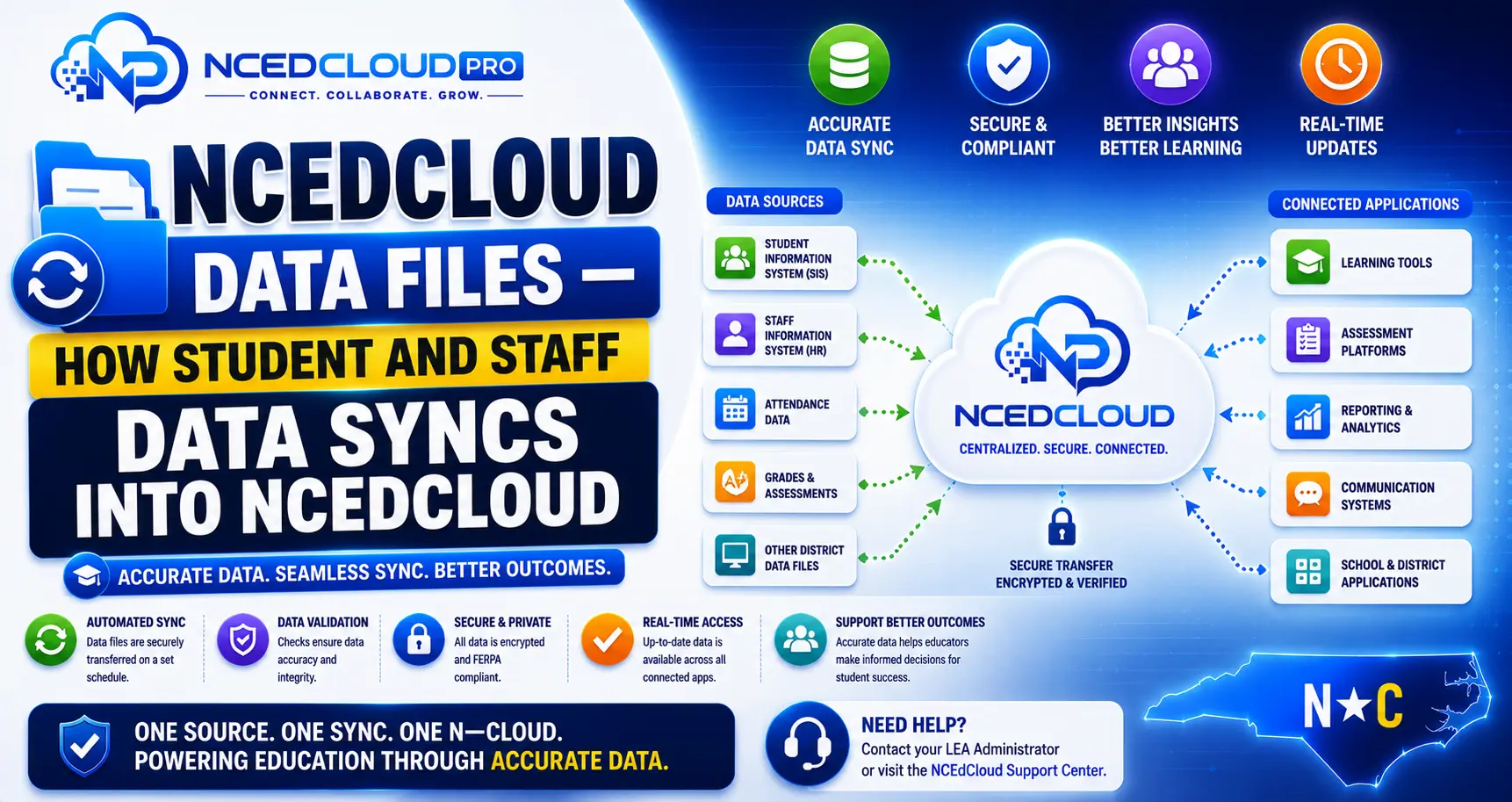
NCEdCloud Data Files — How Student and Staff Data Syncs into NCEdCloud
How Does NCEdCloud Get Its Data?
NCEdCloud user accounts are not created manually by district IT staff. They are generated and updated automatically through data files and sync pipelines that pull from authoritative source systems. RapidIdentity, the platform behind NCEdCloud, processes these data feeds and creates or modifies accounts accordingly.
This applies across the roughly 2.5 million student and staff accounts NCEdCloud manages statewide, across more than 300 North Carolina LEAs and charter schools.
The most important thing to know is that the accuracy of NCEdCloud account data, names, roles, school assignments, and usernames depends entirely on the accuracy of the data in the source systems, not on NCEdCloud itself.
NCEdCloud Data Files Source Systems
| Account Type | Primary Source System | What It Provides |
| Students | PowerSchool (or another district SIS) | Enrollment, grade level, school assignment, student ID |
| Staff (teachers) | Home Base / NCEES | Position, school assignment, role code, employee ID |
| Staff (classified) | District HR/payroll system | Position, employment status, school assignment |
| District administrators | Home Base | Administrative role, LEA assignment |
Learn More About → NCEdCloud Districts Overview
The Student Data Sync Chain
- The district’s registrar enters or updates student enrollment in PowerSchool.
- PowerSchool data syncs to Home Base (for staff) or feeds directly to NCDPI’s data pipeline (for students).
- NCDPI processes the data and sends updates to NCEdCloud’s RapidIdentity platform.
- RapidIdentity creates new accounts, updates existing ones, or deprovisions accounts for students who have withdrawn.
- Changed account data is reflected in NCEdCloud at the next user login or session refresh.
Sync Frequency and Delays
| Event | Typical Delay |
| New student enrollment | 24 to 48 business hours |
| New staff hire | 24 to 48 business hours after HR entry |
| School transfer (student) | 1 to 2 business days |
| Role change (staff) | 1 to 2 business days |
| Account deactivation upon withdrawal | Same day to next business day |
| End-of-year rollover (grade promotion) | Processed during the summer rollover window |
For More Details → NCEdCloud LEA Administrator Role Overview
What Happens When Source Data is Wrong?
If a student’s grade level, school assignment, or name is incorrect in NCEdCloud, the root cause is almost always incorrect data in the SIS. Fixing the issue in NCEdCloud directly does not persist. The next sync overwrites it with the SIS data. The correct fix is:
- Identify the error in NCEdCloud (wrong school, wrong grade, missing account).
- Report the error to the registrar or HR office with the correct information.
- The registrar corrects the record in PowerSchool or Home Base.
- Wait one to two business days for the sync to update NCEdCloud.
LEA Administrators can verify pending sync data through the admin console’s data review tools. If the account itself seems broken rather than just the data, our NCEdCloud troubleshooting guide covers the most common login-related symptoms.
Frequently Asked Questions
Why does a new student not have an NCEdCloud account yet?
The account will not exist in NCEdCloud until the enrollment record has been entered in the district SIS and the sync has been processed. This typically takes 24 to 48 business hours. If the student was enrolled more than 48 hours ago and still has no account, the registrar should verify that the enrollment was entered correctly in PowerSchool.
Can an LEA Administrator manually create a student account that is not in the SIS?
Some RapidIdentity configurations allow manual account creation for exceptions. However, manually created accounts may be overwritten by the next data sync if the SIS does not have a matching record. Contact your NCDPI support contact before creating accounts outside the standard sync process.
Why did a student’s username change during the school year?
Username changes typically occur when the source data changes — a legal name change, a school transfer that updates the username format, or a data correction in the SIS. Check with the registrar to see if any record was updated in PowerSchool.
How does NCEdCloud handle the end-of-year data rollover?
NCDPI coordinates a summer rollover process in which student grade levels are advanced, graduating seniors are deprovisioned, and incoming students from feeder schools are provisioned. This runs on a district-specific schedule during the summer. LEA Administrators receive communication from NCDPI about rollover timelines each spring.
Our district SIS changed. Will NCEdCloud still work?
NCEdCloud integrates with several student information systems. If your district changes SIS vendors, NCDPI and your LEA Administrator need to update the data pipeline configuration. Contact your NCDPI support representative before a SIS migration to ensure NCEdCloud integration is planned as part of the project.
Disclaimer Note: NCEdCloud, RapidIdentity, PowerSchool, and Home Base are trademarks of their respective owners. NCEdCloudPro.com is not affiliated with or endorsed by NCDPI, NCEdCloud, MCNC, or Identity Automation. Read our full disclaimer.