NCEdCloud Invalid Credentials Error — What it Means And How to Fix it
What is the NCEdCloud Invalid Credentials Error?
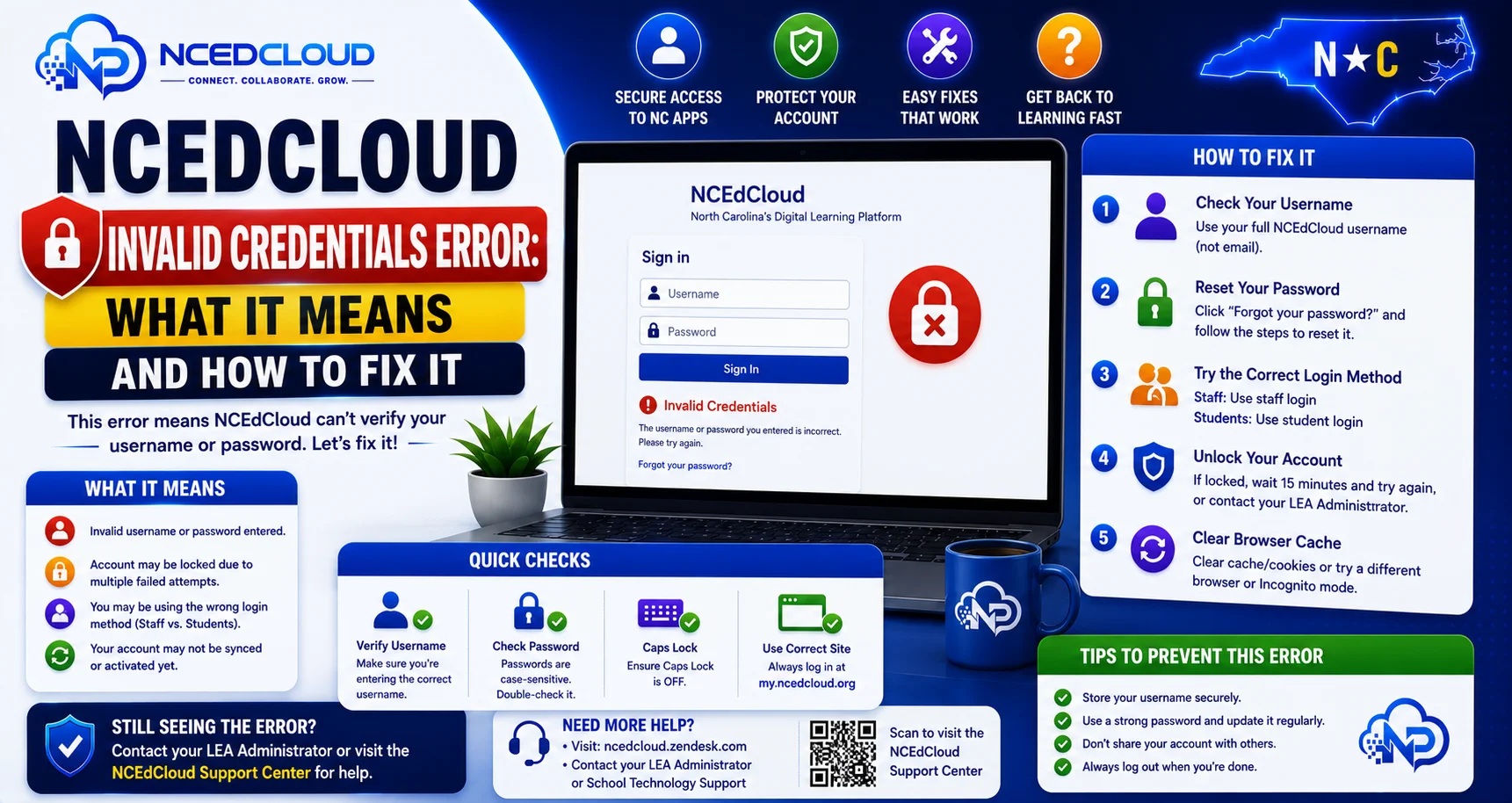
The “Invalid Credentials” error in NCEdCloud appears on the login page when the username and password combination you entered does not match a record in RapidIdentity’s identity platform. This error can affect students, teachers, and administrators across any North Carolina LEA or charter school using my.ncedcloud.org.
The most important thing to know is that “Invalid Credentials” can mean your password is wrong, your username is wrong, or your account is locked. The error message does not always specify which. Read our complete NCEdCloud Not Working guide for how this error compares to other login problems.
Why Do Invalid Credentials Appear?
| Causes | How Common | Fix |
| Wrong password | Very common | Reset using Forgot Password |
| Wrong username | Common | Confirm the username format with the school |
| Password expired | Common for staff | Complete password change at the expiry screen |
| Account locked due to too many attempts | Common | Wait 15-30 minutes or contact the help desk |
| Account not yet claimed | Moderate | Complete account claiming first |
| Caps Lock is on | Very common | Turn off Caps Lock and retype |
| The browser saved the wrong password | Common | Clear saved credentials and type manually |
How to Fix the Invalid Credentials Error?
- Turn off Caps Lock. This is the most overlooked cause — passwords are case-sensitive, and Caps Lock silently reverses the case of every letter you type.
- Clear the username and password fields completely. Retype both from scratch. Do not rely on browser autofill.
- Confirm your username format. NCEdCloud usernames are not email addresses by default. Ask your teacher or IT coordinator what format your district uses if you are unsure. See our Username guide for common formats.
- Try the Forgot Password link. Go to my.ncedcloud.org, click “Forgot Password,” and complete the challenge question flow to set a new password. Read our Forgot Password guide for instructions.
- Check whether your account is locked. If you have tried more than 5 times, the account may be locked. Wait 15 to 30 minutes and try again, or contact your school’s help desk for an immediate unlock. See our complete Account Locked guide.
- Check whether your account has been claimed. If you are a new user, your account requires claiming before a password exists. Click “Claim My Account” instead of trying to log in.
Invalid Credentials vs. Account Locked
Both errors can appear as “Invalid Credentials” in some NCEdCloud configurations.
| Symptom | More Likely Cause |
| Error after the first or second attempt | Wrong password or username |
| Error after 5 or more attempts | Account locked |
| Error despite correct password | Account locked or password expired |
| Error on a brand-new account | Account not yet claimed |
Complete Guide About → NCEdCloud Password Expired
When to Contact the Help Desk
Contact your school help desk if:
- The Forgot Password flow does not work because you have not set up challenge questions
- You cannot remember your username, and cannot find it
- You have waited 30 minutes, and the account is still locked
- You are confident the credentials are correct, but the error persists after clearing the cache
Learn More About → NCEdCloud Cache Fix
Frequently Asked Questions
Why does NCEdCloud say “Invalid Credentials” when I know my password is right?
Three common causes when you are confident the password is correct: the account is locked from previous failed attempts. The password has expired, requiring a change at the login screen, or you are entering the password with incorrect capitalization. Try Forgot Password to rule out password issues, then contact the help desk if the error continues.
Is “Invalid Credentials” the same as being locked out?
Not exactly. Invalid credentials appear when the login attempt fails for any reason. Account lockout is a specific state triggered after several failed attempts. The two can coexist — you may be locked out and also enter the wrong credentials. Waiting 15-30 minutes and then using Forgot Password covers both scenarios.
Why does my student’s NCEdCloud login work on school Wi-Fi but not at home?
This is not typically related to credentials — it is more likely a browser issue. Home networks sometimes load a cached version of the login page. Try an incognito window at home and make sure you are going to my.ncedcloud.org directly rather than clicking an old bookmark.
Can a data sync issue cause the Invalid Credentials error?
Yes, in rare cases. If a student’s account was recently migrated, renamed, or re-provisioned from the SIS, the credentials may not match what the system expects. Contact your LEA help desk if the error persists after successful Forgot Password resets.
My username and password are saved in my browser and used to work. Now I get Invalid Credentials. What happened?
Saved browser credentials become stale when a password is changed. If you or an admin changed your NCEdCloud password and the browser is still submitting the old one, you get Invalid Credentials. Go to your browser’s saved passwords and delete the NCEdCloud entry, then log in manually with your current credentials.
Disclaimer Note: NCEdCloud, RapidIdentity, and Identity Automation are trademarks of their respective owners. NCEdCloudPro.com is not affiliated with or endorsed by NCDPI, NCEdCloud, MCNC, or Identity Automation. Read our full disclaimer.